
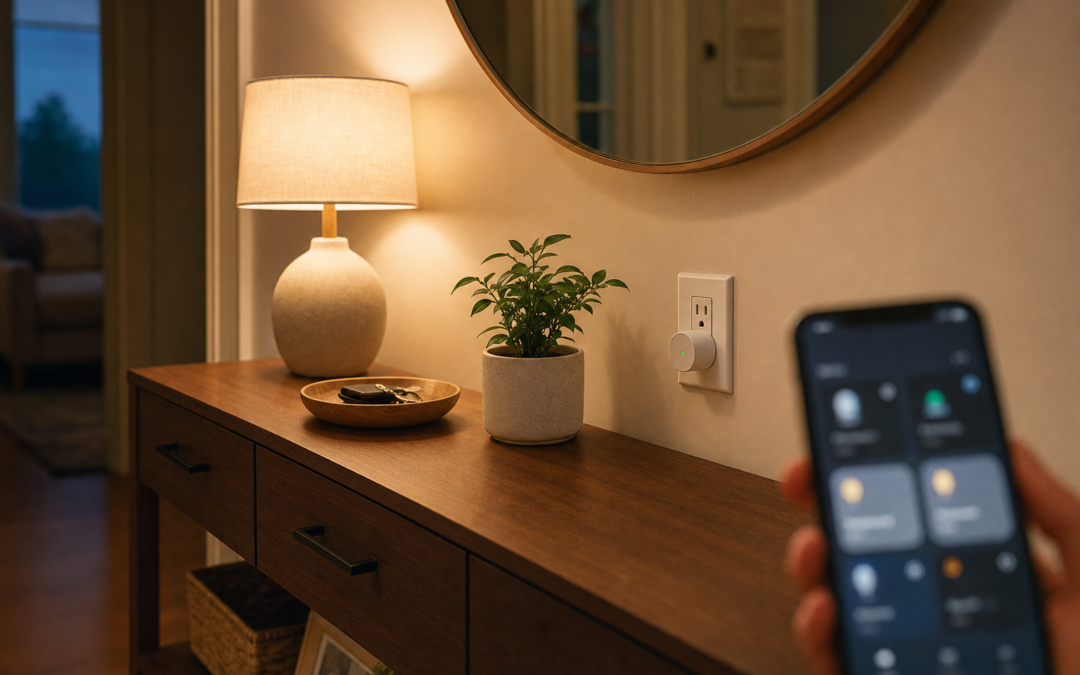
A smart home starter kit should feel useful in week one—not like a box of gadgets waiting for a free Saturday that never comes. The practical buy order for most households is simple: smart plugs for lamps and appliances, then lighting via bulbs or wall switches, then one high‑value hub device like a thermostat or doorbell. This guide keeps you out of ecosystem sprawl and focused on devices you will actually automate.
Everything here ties back to our Smart Home hub. For deeper lighting decisions, use our dedicated guides to the best smart light switches and best smart bulbs and starter kits so this overview stays about sequence and strategy.
Buy Order That Builds Confidence
Start with failures that are cheap to reverse. A smart plug teaches app control, schedules, and voice commands without opening a wall. Next, solve lighting in the rooms you use after dark. Only then spend on thermostats, doorbells, or cameras that need wiring, subscriptions, or household consensus.
Resist the “all-in hub bundle” that mixes brands with overlapping apps. One plug brand, one lighting strategy, one climate brand is enough for year one.
- Phase 1: plugs on lamps, fans, holiday loads
- Phase 2: bulbs or switches for primary rooms
- Phase 3: thermostat or doorbell as the flagship
- Phase 4: cameras and garage after Wi‑Fi is solid
- Always: same phone accounts and strong passwords
Smart Plugs: The On-Ramp
Mini plugs hide behind furniture and switch lamps on schedules that look “lived in.” Choose models rated for your load—space heaters and big appliances are not toy loads. Prefer plugs with energy monitoring only if you will look at the data; otherwise keep it simple.
HomeKit, Alexa, and Google compatibility matter more than RGB status lights. Pick the assistant your phones already use.

Kasa Smart Plug Mini 15A, EP25P4, Apple HomeKit Supported — Kasa Smart Plug Mini 15A packs with HomeKit support are an ideal first buy—schedule lamps, set away modes, and learn automation habits before you open a single switch box.
Lighting Path A: Bulb Kits
Smart bulbs win when you rent, lack a neutral wire, or want color scenes in a single lamp. Starter kits that include a bridge stabilize larger bulb counts and cut Wi‑Fi chatter. They lose when someone flips the wall switch off and “breaks” the bulb until it is powered again—educate the household or use switches instead.
For a full comparison of kits versus à la carte bulbs, see our smart bulbs starter kit guide.

Philips Hue Starter Kit, Bridge Pro + 4 A19 E26 Smart Bulbs — A Philips Hue starter kit with Bridge Pro and A19 bulbs is the polished bulb-path entry when you want reliable scenes and room groups—plan which wall switches must stay on for bulbs to remain reachable.
Lighting Path B: Smart Switches and Dimmers
Smart switches keep control on the wall where muscle memory lives. Guests do not need your phone. You will need to confirm neutral wires, multi‑way topologies, and dimmer/bulb compatibility. Wi‑Fi switches are easy to start; hub-based systems like Caseta trade a hub for rock-solid reliability and clear dimmer behavior.
Read our smart light switch guide before you buy a fistful of mismatched models. Mixing every brand on every floor is how sprawl begins.

Kasa Smart Light Switch, Single Pole, Need Neutral Wire, HS200 — Kasa HS200 single-pole Wi‑Fi switches are a straightforward neutral-required upgrade when you want app and voice control without adding a proprietary lighting hub.

Lutron Caseta Diva Smart Dimmer Switch (Smart Hub Required) — Lutron Caseta Diva dimmers (hub required) are the reliability pick for households that want premium dimming feel and strong multi‑way options—budget the hub once, then expand room by room.
Pick One Flagship After Lighting Works
When plugs and lights behave, add either a smart thermostat or a video doorbell—whichever pain is louder. Climate waste every month argues for a thermostat; package theft and porch unknowns argue for a doorbell. Cameras and garage controls come after your Wi‑Fi mesh survives two video streams.
Document SSID names, IoT network passwords, and which rooms use bulbs vs switches. A one-page legend prevents “why is this lamp dumb again?” nights.
Avoiding Ecosystem Sprawl
Every new app is a login to forget and a firmware surface to ignore. Prefer Matter/Thread-ready gear when choosing long-term lighting, but do not abandon working Wi‑Fi plugs just to chase a logo. Consistency beats novelty.
Voice assistants should be a convenience layer, not the only way to turn on the hallway. Wall control and physical switches remain essential during outages and phone-free mornings.
Network Prep Before the Shopping Cart
Update the router. Create a dedicated 2.4 GHz IoT SSID if you can. Note mesh node placement near the porch and garage. Disable aggressive client steering that boots flaky IoT devices. If your Wi‑Fi already drops video calls, fix that before a camera kit arrives.
Electrical basics still apply: kill power when installing switches, use listed devices, and hire help for unfamiliar multi‑way boxes. Our Electrical hub collects related DIY safety projects.
Weekend Setup Plan
Saturday morning: plugs on two lamps, schedules for dusk. Saturday afternoon: either Hue kit in the living room or one smart switch on a single-pole hallway. Sunday: routines that tie “good night” to lights off—and only then browse thermostats or doorbells.
Stop while it still feels fun. A half-configured camera empire teaches frustration, not automation.
Mistakes That Waste Money
Buying cameras first on weak Wi‑Fi. Mixing three lighting brands in one hallway. Smart bulbs behind switched-off power with no household rules. Skipping neutral checks on Wi‑Fi switches. No password manager for shared apps. Over-automating before basic schedules work.
Habits That Keep Smart Devices Reliable
Update firmware quarterly. Replace camera and doorbell batteries on a calendar, not when the app screams at midnight. Wipe outdoor lenses seasonally so false alerts do not train you to ignore real ones. Revisit routines when seasons change, and prune unused automations so the apps stay understandable.
Twice a year, walk the house: confirm thermostats still call heat and cool, test garage auto-close with the photoelectric sensors unobstructed, and verify backup Wi‑Fi coverage where cameras live. Label breakers that feed transformers and hubs.
Seasonal stress tests matter—summer HVAC demand, winter low batteries, holiday guest networks. Fix flaky 2.4 GHz coverage before you add another battery camera that drops offline every evening.
Safety, Power, and Know-Your-Limits
Kill power at the breaker before you open thermostat, switch, doorbell transformer, or garage controller wiring. Verify with a non-contact tester. Battery cameras and plugs still need safe mounting—ladders on uneven driveways and attic crawl spaces cause more injuries than Wi‑Fi ever will.
Do not defeat safety sensors on garage doors, skip GFCI where code requires it, or overload circuits with daisy-chained power strips feeding hubs and chargers. If you smell burning plastic, see scorched insulation, or your HVAC control board looks unfamiliar, stop and hire a licensed electrician or HVAC technician.
Smart home gear sits on your network. Use unique passwords, keep firmware updated, and segregate IoT devices on a guest or IoT VLAN when your router supports it. Convenience should never mean an unlocked digital front door.
Buying Checklist
- Confirm assistant ecosystem (Alexa, Google, HomeKit)
- Buy plugs before wall surgery
- Choose bulbs or switches deliberately—not both at random
- Check neutrals and multi‑way needs for switches
- Stabilize Wi‑Fi before video devices
- Add one flagship (thermostat or doorbell) after lighting works
- Write down accounts and room strategies
FAQ: Smart Home Starter Kits
Should I buy a big branded kit?
Only if the included devices match rooms you will automate this month; otherwise build from plugs upward.
Bulbs or switches first?
Renters and uncertain wiring: bulbs. Owners who want wall control: switches (see our dedicated guides).
Do I need Matter right now?
Nice future-proofing; not mandatory if your current ecosystem already works.
How many plugs are enough?
Two to four teaching devices beat a twelve-pack that sits sealed.
What about hubs?
Hue Bridge and Caseta hubs earn their keep at scale; tiny Wi‑Fi-only homes can wait.
Next Steps
Buy plugs, choose a lighting path, then add one flagship. Use the product callouts above as a short shortlist, and dive deeper with our smart switch and smart bulb pillars when you are ready to commit room by room.
Continue through thermostats, doorbells, cameras, and garage control in the Smart Home hub once the basics feel boring—in the best way.
Keep receipts and a photo of each device’s MAC or serial for warranty and network ACL use. Future mesh upgrades go smoother when you know what lives on the IoT SSID.
Celebrate small wins: a lamp that welcomes you home is already a smarter house than a drawer of unopened sensors.
Practical Notes for Smart Home Starter Kit
Keep receipts, warranty info, and a phone photo of model numbers in a home maintenance album. When a thermostat, doorbell, camera, or garage controller needs support years later, identity beats guesswork. Schedule a seasonal reminder to update firmware, replace batteries, and confirm Wi‑Fi nodes still cover porches and garages.
If you share the home with guests or renters, label breakers that feed transformers and hubs, and leave a one-page tip sheet: which app controls lights, how to stop a garage door, and when to call an electrician instead of forcing a switch box. Clear instructions prevent panicked mistakes.
Choose listed devices and quality mounts over mystery-bin adapters. Compatibility mistakes and skipped safety sensors cost more than the dollars you save.
Practical Notes for Smart Home Starter Kit
Keep receipts, warranty info, and a phone photo of model numbers in a home maintenance album. When a thermostat, doorbell, camera, or garage controller needs support years later, identity beats guesswork. Schedule a seasonal reminder to update firmware, replace batteries, and confirm Wi‑Fi nodes still cover porches and garages.
If you share the home with guests or renters, label breakers that feed transformers and hubs, and leave a one-page tip sheet: which app controls lights, how to stop a garage door, and when to call an electrician instead of forcing a switch box. Clear instructions prevent panicked mistakes.
Choose listed devices and quality mounts over mystery-bin adapters. Compatibility mistakes and skipped safety sensors cost more than the dollars you save.
Practical Notes for Smart Home Starter Kit
Keep receipts, warranty info, and a phone photo of model numbers in a home maintenance album. When a thermostat, doorbell, camera, or garage controller needs support years later, identity beats guesswork. Schedule a seasonal reminder to update firmware, replace batteries, and confirm Wi‑Fi nodes still cover porches and garages.
If you share the home with guests or renters, label breakers that feed transformers and hubs, and leave a one-page tip sheet: which app controls lights, how to stop a garage door, and when to call an electrician instead of forcing a switch box. Clear instructions prevent panicked mistakes.
Choose listed devices and quality mounts over mystery-bin adapters. Compatibility mistakes and skipped safety sensors cost more than the dollars you save.
Practical Notes for Smart Home Starter Kit
Keep receipts, warranty info, and a phone photo of model numbers in a home maintenance album. When a thermostat, doorbell, camera, or garage controller needs support years later, identity beats guesswork. Schedule a seasonal reminder to update firmware, replace batteries, and confirm Wi‑Fi nodes still cover porches and garages.
If you share the home with guests or renters, label breakers that feed transformers and hubs, and leave a one-page tip sheet: which app controls lights, how to stop a garage door, and when to call an electrician instead of forcing a switch box. Clear instructions prevent panicked mistakes.
Choose listed devices and quality mounts over mystery-bin adapters. Compatibility mistakes and skipped safety sensors cost more than the dollars you save.
Practical Notes for Smart Home Starter Kit
Keep receipts, warranty info, and a phone photo of model numbers in a home maintenance album. When a thermostat, doorbell, camera, or garage controller needs support years later, identity beats guesswork. Schedule a seasonal reminder to update firmware, replace batteries, and confirm Wi‑Fi nodes still cover porches and garages.
If you share the home with guests or renters, label breakers that feed transformers and hubs, and leave a one-page tip sheet: which app controls lights, how to stop a garage door, and when to call an electrician instead of forcing a switch box. Clear instructions prevent panicked mistakes.
Choose listed devices and quality mounts over mystery-bin adapters. Compatibility mistakes and skipped safety sensors cost more than the dollars you save.
Practical Notes for Smart Home Starter Kit
Keep receipts, warranty info, and a phone photo of model numbers in a home maintenance album. When a thermostat, doorbell, camera, or garage controller needs support years later, identity beats guesswork. Schedule a seasonal reminder to update firmware, replace batteries, and confirm Wi‑Fi nodes still cover porches and garages.
If you share the home with guests or renters, label breakers that feed transformers and hubs, and leave a one-page tip sheet: which app controls lights, how to stop a garage door, and when to call an electrician instead of forcing a switch box. Clear instructions prevent panicked mistakes.
Choose listed devices and quality mounts over mystery-bin adapters. Compatibility mistakes and skipped safety sensors cost more than the dollars you save.
Practical Notes for Smart Home Starter Kit
Keep receipts, warranty info, and a phone photo of model numbers in a home maintenance album. When a thermostat, doorbell, camera, or garage controller needs support years later, identity beats guesswork. Schedule a seasonal reminder to update firmware, replace batteries, and confirm Wi‑Fi nodes still cover porches and garages.
If you share the home with guests or renters, label breakers that feed transformers and hubs, and leave a one-page tip sheet: which app controls lights, how to stop a garage door, and when to call an electrician instead of forcing a switch box. Clear instructions prevent panicked mistakes.
Choose listed devices and quality mounts over mystery-bin adapters. Compatibility mistakes and skipped safety sensors cost more than the dollars you save.
Practical Notes for Smart Home Starter Kit
Keep receipts, warranty info, and a phone photo of model numbers in a home maintenance album. When a thermostat, doorbell, camera, or garage controller needs support years later, identity beats guesswork. Schedule a seasonal reminder to update firmware, replace batteries, and confirm Wi‑Fi nodes still cover porches and garages.
If you share the home with guests or renters, label breakers that feed transformers and hubs, and leave a one-page tip sheet: which app controls lights, how to stop a garage door, and when to call an electrician instead of forcing a switch box. Clear instructions prevent panicked mistakes.
Choose listed devices and quality mounts over mystery-bin adapters. Compatibility mistakes and skipped safety sensors cost more than the dollars you save.