
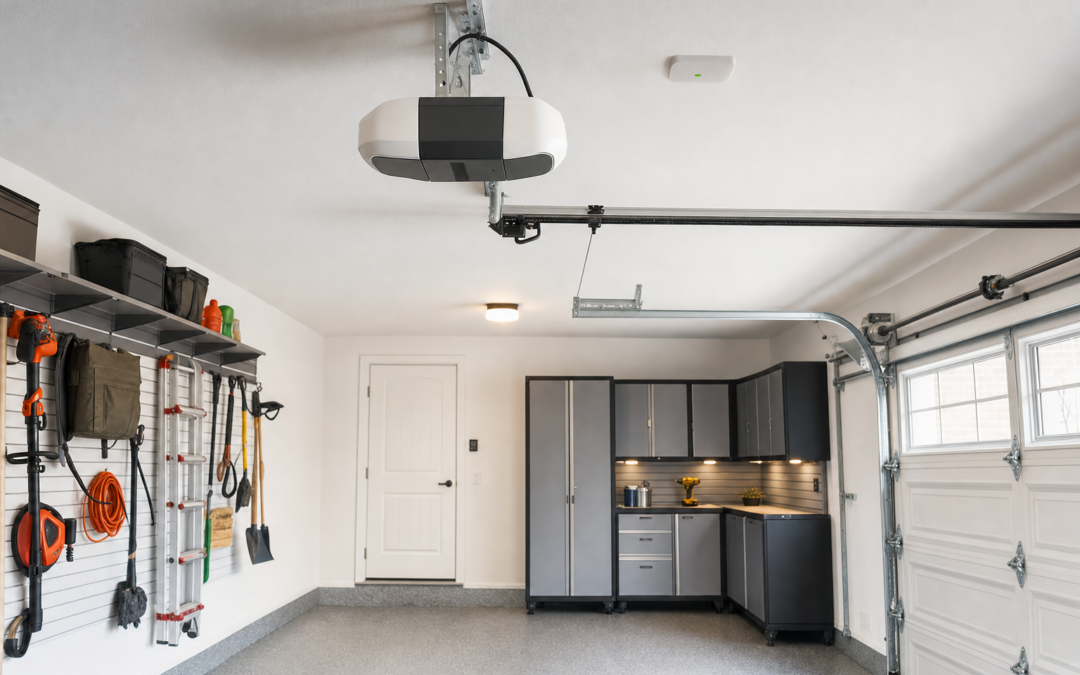
Smart garage door control puts open/close and status alerts on your phone—useful for deliveries, teenagers learning responsibility, and the classic “did I leave it open?” anxiety at 11 p.m. Controllers add Wi‑Fi brains to many existing openers without replacing the entire motor. This 2026 guide covers what Chamberlain-style smart controls do, safety non‑negotiables, visitor access, and install basics.
Browse more connected upgrades in our Smart Home hub. Garage projects often sit beside storage goals in our Garage Storage hub, and evening driveway lighting pairs well with smart switches or smart bulbs so cameras and pedestrians can see.
What Smart Garage Controllers Actually Do
Typical add‑on controllers sense door position, command the opener via a wired interface or proprietary link, and push notifications when the door opens or stays ajar past a timer. App features may include guest PINs, scheduled auto‑close, history logs, and voice assistant hooks.
They do not replace worn rollers, broken springs, or misaligned photoelectric sensors. Fix mechanical health first; then add intelligence.
- Remote open/close: with security locked down
- Open-too-long alerts: the real killer feature
- Auto-close rules: use cautiously with clear sensor health
- Visitor access: time-limited codes beat hiding keys
- History: who opened it and when

CHAMBERLAIN Smart Garage Control — Chamberlain Smart Garage Control is a practical add-on path for many compatible openers when you want phone access and alerts without a full motor swap—verify compatibility with your opener model and follow sensor safety checks during setup.
Safety Sensors Are Not Optional
Photoelectric eyes near the floor must align and stay clean. Never bypass safety reverse “because the app is easier.” Auto-close schedules are dangerous if sensors are dirty, misaimed, or defeated. Test reversal monthly with a sturdy roll of paper towels in the path—doors should reverse promptly.
Springs and cables store lethal energy. Adjustments belong to trained techs. Smart controls command the opener; they do not make a broken door safe.
Wi‑Fi in the Garage Reality Check
Garages are RF hell: foil insulation, metal doors, distance from the router. Stand inside with your phone on the IoT SSID and stream a video; if it struggles, add a mesh node before you blame the controller. Mount the controller per instructions with antenna orientation that favors the house, not the driveway aluminum.
Firmware updates need that same path—weak Wi‑Fi means missed security patches.
Visitor Access Without Hiding Keys
Delivery PINs and guest accounts beat magnetic key boxes every time—if you revoke codes when the project ends. Use unique codes per person when the app allows. Pair with camera coverage so you know who used access. Do not enable unattended open for random strangers without package locker habits and motion review.
Teach teens that notifications go to parents. Trust, but verify with history logs.
Install Basics
1. Confirm opener compatibility on the manufacturer list. 2. Kill power to the opener. 3. Mount the controller as directed—often near the motor unit. 4. Connect the interface cable to the opener’s control terminals or partner port. 5. Restore power; complete app pairing on 2.4 GHz Wi‑Fi. 6. Test open, close, and obstruction reverse. 7. Set alerts for door-open duration; leave auto-close off until you trust sensors for weeks. 8. Add guest codes sparingly.
If wiring diagrams confuse you, hire a tech who understands both openers and Wi‑Fi. A wrong terminal can mean a door that will not stop—unacceptable.
Auto-Close, Schedules, and Edge Cases
Auto-close helps forgetful households and vacation rentals. It also closes on toys, pets, and distracted adults if sensors fail. Start with alerts only. Add auto-close with generous delays and confirmed sensor alignment. Disable it during parties, move-in days, and workshop weekends when the door cycles constantly.
Vacation mode should notify multiple adults, not one phone left in airplane mode on a flight.
Pairing With Cameras and Lighting
A garage camera aimed at the man-door and a soft driveway light make remote open decisions smarter. Use lighting schedules from our smart switch guide or smart bulb kits so late returns are not pitch black. Do not rely on the opener light alone—it times out.
Mistakes That Create Security Holes
Weak account passwords on the garage app. Shared family logins instead of invites. Auto-close with dirty sensors. Ignoring spring maintenance. Guest codes that never expire. Wi‑Fi guest networks that cannot reach the controller when you need them.
Habits That Keep Smart Devices Reliable
Update firmware quarterly. Replace camera and doorbell batteries on a calendar, not when the app screams at midnight. Wipe outdoor lenses seasonally so false alerts do not train you to ignore real ones. Test obstruction reverse monthly, wipe sensor lenses, and audit guest codes after every contractor visit.
Twice a year, walk the house: confirm thermostats still call heat and cool, test garage auto-close with the photoelectric sensors unobstructed, and verify backup Wi‑Fi coverage where cameras live. Label breakers that feed transformers and hubs.
Seasonal stress tests matter—summer HVAC demand, winter low batteries, holiday guest networks. Fix flaky 2.4 GHz coverage before you add another battery camera that drops offline every evening.
Safety, Power, and Know-Your-Limits
Kill power at the breaker before you open thermostat, switch, doorbell transformer, or garage controller wiring. Verify with a non-contact tester. Battery cameras and plugs still need safe mounting—ladders on uneven driveways and attic crawl spaces cause more injuries than Wi‑Fi ever will.
Do not defeat safety sensors on garage doors, skip GFCI where code requires it, or overload circuits with daisy-chained power strips feeding hubs and chargers. If you smell burning plastic, see scorched insulation, or your HVAC control board looks unfamiliar, stop and hire a licensed electrician or HVAC technician.
Smart home gear sits on your network. Use unique passwords, keep firmware updated, and segregate IoT devices on a guest or IoT VLAN when your router supports it. Convenience should never mean an unlocked digital front door.
Buying Checklist
- Confirm exact opener model compatibility
- Verify garage Wi‑Fi strength at the motor
- Inspect photoelectric sensors and door balance
- Plan alert recipients (not just one phone)
- Decide on guest PIN policy
- Leave auto-close off until trusted
- Coordinate camera and lighting coverage
FAQ: Smart Garage Control
Will it work with my old opener?
Only if the compatibility list says so—age and brand matter.
Is remote open safe?
With strong account security, alerts, and cameras, yes for known users; never treat it casually.
Do I need a new motor?
Not if the opener is healthy and listed as compatible; replace motors that struggle or lack modern safety features.
What about MyQ and partner locks?
Ecosystem partnerships change—check current integrations for locks and cameras you already own.
Can I install it myself?
Many homeowners can if wiring is clear and safety tests pass; hire help when unsure.
Next Steps
Confirm compatibility and sensor health, then add phone alerts before auto-close. Use the Chamberlain smart control callout above as a starting point and continue through cameras and doorbells in our Smart Home hub.
Improve night visibility with smart switches or smart bulbs on driveway and exterior circuits, and organize the garage so sensors stay unblocked—see the Garage Storage hub for racks and layouts that keep floors clear.
Keep the manual wall button working. Apps fail; physical control must remain.
Photograph the opener model sticker and controller serial after install. Compatibility questions and warranty claims go faster with those images saved.
Practical Notes for Smart Garage Door Control Guide
Keep receipts, warranty info, and a phone photo of model numbers in a home maintenance album. When a thermostat, doorbell, camera, or garage controller needs support years later, identity beats guesswork. Schedule a seasonal reminder to update firmware, replace batteries, and confirm Wi‑Fi nodes still cover porches and garages.
If you share the home with guests or renters, label breakers that feed transformers and hubs, and leave a one-page tip sheet: which app controls lights, how to stop a garage door, and when to call an electrician instead of forcing a switch box. Clear instructions prevent panicked mistakes.
Choose listed devices and quality mounts over mystery-bin adapters. Compatibility mistakes and skipped safety sensors cost more than the dollars you save.
Practical Notes for Smart Garage Door Control Guide
Keep receipts, warranty info, and a phone photo of model numbers in a home maintenance album. When a thermostat, doorbell, camera, or garage controller needs support years later, identity beats guesswork. Schedule a seasonal reminder to update firmware, replace batteries, and confirm Wi‑Fi nodes still cover porches and garages.
If you share the home with guests or renters, label breakers that feed transformers and hubs, and leave a one-page tip sheet: which app controls lights, how to stop a garage door, and when to call an electrician instead of forcing a switch box. Clear instructions prevent panicked mistakes.
Choose listed devices and quality mounts over mystery-bin adapters. Compatibility mistakes and skipped safety sensors cost more than the dollars you save.
Practical Notes for Smart Garage Door Control Guide
Keep receipts, warranty info, and a phone photo of model numbers in a home maintenance album. When a thermostat, doorbell, camera, or garage controller needs support years later, identity beats guesswork. Schedule a seasonal reminder to update firmware, replace batteries, and confirm Wi‑Fi nodes still cover porches and garages.
If you share the home with guests or renters, label breakers that feed transformers and hubs, and leave a one-page tip sheet: which app controls lights, how to stop a garage door, and when to call an electrician instead of forcing a switch box. Clear instructions prevent panicked mistakes.
Choose listed devices and quality mounts over mystery-bin adapters. Compatibility mistakes and skipped safety sensors cost more than the dollars you save.
Practical Notes for Smart Garage Door Control Guide
Keep receipts, warranty info, and a phone photo of model numbers in a home maintenance album. When a thermostat, doorbell, camera, or garage controller needs support years later, identity beats guesswork. Schedule a seasonal reminder to update firmware, replace batteries, and confirm Wi‑Fi nodes still cover porches and garages.
If you share the home with guests or renters, label breakers that feed transformers and hubs, and leave a one-page tip sheet: which app controls lights, how to stop a garage door, and when to call an electrician instead of forcing a switch box. Clear instructions prevent panicked mistakes.
Choose listed devices and quality mounts over mystery-bin adapters. Compatibility mistakes and skipped safety sensors cost more than the dollars you save.
Practical Notes for Smart Garage Door Control Guide
Keep receipts, warranty info, and a phone photo of model numbers in a home maintenance album. When a thermostat, doorbell, camera, or garage controller needs support years later, identity beats guesswork. Schedule a seasonal reminder to update firmware, replace batteries, and confirm Wi‑Fi nodes still cover porches and garages.
If you share the home with guests or renters, label breakers that feed transformers and hubs, and leave a one-page tip sheet: which app controls lights, how to stop a garage door, and when to call an electrician instead of forcing a switch box. Clear instructions prevent panicked mistakes.
Choose listed devices and quality mounts over mystery-bin adapters. Compatibility mistakes and skipped safety sensors cost more than the dollars you save.
Practical Notes for Smart Garage Door Control Guide
Keep receipts, warranty info, and a phone photo of model numbers in a home maintenance album. When a thermostat, doorbell, camera, or garage controller needs support years later, identity beats guesswork. Schedule a seasonal reminder to update firmware, replace batteries, and confirm Wi‑Fi nodes still cover porches and garages.
If you share the home with guests or renters, label breakers that feed transformers and hubs, and leave a one-page tip sheet: which app controls lights, how to stop a garage door, and when to call an electrician instead of forcing a switch box. Clear instructions prevent panicked mistakes.
Choose listed devices and quality mounts over mystery-bin adapters. Compatibility mistakes and skipped safety sensors cost more than the dollars you save.
Practical Notes for Smart Garage Door Control Guide
Keep receipts, warranty info, and a phone photo of model numbers in a home maintenance album. When a thermostat, doorbell, camera, or garage controller needs support years later, identity beats guesswork. Schedule a seasonal reminder to update firmware, replace batteries, and confirm Wi‑Fi nodes still cover porches and garages.
If you share the home with guests or renters, label breakers that feed transformers and hubs, and leave a one-page tip sheet: which app controls lights, how to stop a garage door, and when to call an electrician instead of forcing a switch box. Clear instructions prevent panicked mistakes.
Choose listed devices and quality mounts over mystery-bin adapters. Compatibility mistakes and skipped safety sensors cost more than the dollars you save.
Practical Notes for Smart Garage Door Control Guide
Keep receipts, warranty info, and a phone photo of model numbers in a home maintenance album. When a thermostat, doorbell, camera, or garage controller needs support years later, identity beats guesswork. Schedule a seasonal reminder to update firmware, replace batteries, and confirm Wi‑Fi nodes still cover porches and garages.
If you share the home with guests or renters, label breakers that feed transformers and hubs, and leave a one-page tip sheet: which app controls lights, how to stop a garage door, and when to call an electrician instead of forcing a switch box. Clear instructions prevent panicked mistakes.
Choose listed devices and quality mounts over mystery-bin adapters. Compatibility mistakes and skipped safety sensors cost more than the dollars you save.
Practical Notes for Smart Garage Door Control Guide
Keep receipts, warranty info, and a phone photo of model numbers in a home maintenance album. When a thermostat, doorbell, camera, or garage controller needs support years later, identity beats guesswork. Schedule a seasonal reminder to update firmware, replace batteries, and confirm Wi‑Fi nodes still cover porches and garages.
If you share the home with guests or renters, label breakers that feed transformers and hubs, and leave a one-page tip sheet: which app controls lights, how to stop a garage door, and when to call an electrician instead of forcing a switch box. Clear instructions prevent panicked mistakes.
Choose listed devices and quality mounts over mystery-bin adapters. Compatibility mistakes and skipped safety sensors cost more than the dollars you save.
Practical Notes for Smart Garage Door Control Guide
Keep receipts, warranty info, and a phone photo of model numbers in a home maintenance album. When a thermostat, doorbell, camera, or garage controller needs support years later, identity beats guesswork. Schedule a seasonal reminder to update firmware, replace batteries, and confirm Wi‑Fi nodes still cover porches and garages.
If you share the home with guests or renters, label breakers that feed transformers and hubs, and leave a one-page tip sheet: which app controls lights, how to stop a garage door, and when to call an electrician instead of forcing a switch box. Clear instructions prevent panicked mistakes.
Choose listed devices and quality mounts over mystery-bin adapters. Compatibility mistakes and skipped safety sensors cost more than the dollars you save.